
Design every breakout around one clear objective, one concrete deliverable, and one assigned facilitator. Everything else is a lever you pull to serve those three things: pick a format that matches the objective, time the report-back before you write a single prompt, and hand every group a template so the deliverable exists whether or not you’re standing in the room.
TL;DR:
- Breakout sessions are most effective when designed around a clear objective, concrete deliverable, and assigned facilitator, ensuring productive small-group work.
- Match the format to your goal: use World Café for broad input, Fishbowl for debate, Roundtable for problem-solving, or Lightning Talks for volume, depending on desired outcome.
- Planning involves specifying a precise objective, pairing it with a specific deliverable, and preparing templates and roles before facilitating to ensure efficiency and clarity.
- Virtual breakouts require explicit instructions, pre-assigned groups, shared digital workspaces, and timely prompts to maintain engagement and productivity.
- Managing conflicts and adaptability strategies—such as redirecting dominant voices, handling silence with specific questions, and adjusting formats for group size—are crucial for effective breakout sessions.
Table of Contents
- What Is a Breakout Session, and When Should You Use One?
- Why Bother With Breakout Groups at All?
- Which Breakout Format Fits Your Objective?
- How Do You Plan a Breakout Session Step by Step?
- How Do You Write a Facilitator Script and Assign Roles?
- How Do You Run Breakouts Virtually or in a Hybrid Format?
- What Room Setup and Logistics Do In-Person Breakouts Need?
- How Do You Handle a Breakout That’s Going Sideways?
- What Are Some Ready-to-Use Breakout Ideas by Objective?
- A Copy-Paste Agenda for a 60 to 90 Minute Breakout Session
- What Happens When a Breakout Group Turns Into a Conflict?
- How Do You Adapt Breakouts for Different Group Sizes and Participant Types?
- Middy Matthews’ Perspective: Training, Not Selling, Applies to Facilitation Too
- Let Middy Design and Run the Breakout for You
- Sources
- FAQ
What Is a Breakout Session, and When Should You Use One?
A breakout session splits a larger group into smaller clusters to work a specific task, then reconvenes them to share what they produced. It’s the format of choice for skill practice, ideation, and structured networking. What it is not is a container for whatever you couldn’t fit into the main agenda.
Breakouts earn their place when the room needs to generate multiple answers, not converge on one. If the goal is a single decision, keep everyone together. If an expert has forty-five minutes of material to deliver, that’s a keynote or a workshop segment, not six tables talking past each other. The SessionLab workshop planning framework treats breakouts as one stage in a larger arc, moving from vision to design to action, not a stand-alone filler block. Done well, a breakout produces a document, a decision, or a plan, and it pulls more voices into the room than a plenary Q&A ever will.
Why Bother With Breakout Groups at All?
Adults learn by doing, not by listening. A breakout forces every participant to apply an idea immediately instead of nodding along and forgetting it by lunch. That single shift, from passive audience to active contributor, is the entire case for spending agenda time on small groups instead of another slide deck.
Stable or choice-based groupings also build psychological safety that a 200-person plenary can’t replicate. Someone who won’t raise a hand in front of the whole conference will argue a point at a table of six. Sequencing matters too: agenda design research recommends pairing plenary input with a short, active breakout and a focused report-back, which keeps energy up and prevents the information dump that makes people check their phones. Pair any of this with a deliverable, and you get something rarer than engagement: material people actually use after the event ends.
Which Breakout Format Fits Your Objective?
Format is not decoration. It’s the mechanism that determines whether your objective is even achievable. A taxonomy of breakout types commonly used by conference organizers gives you a short list worth memorizing:
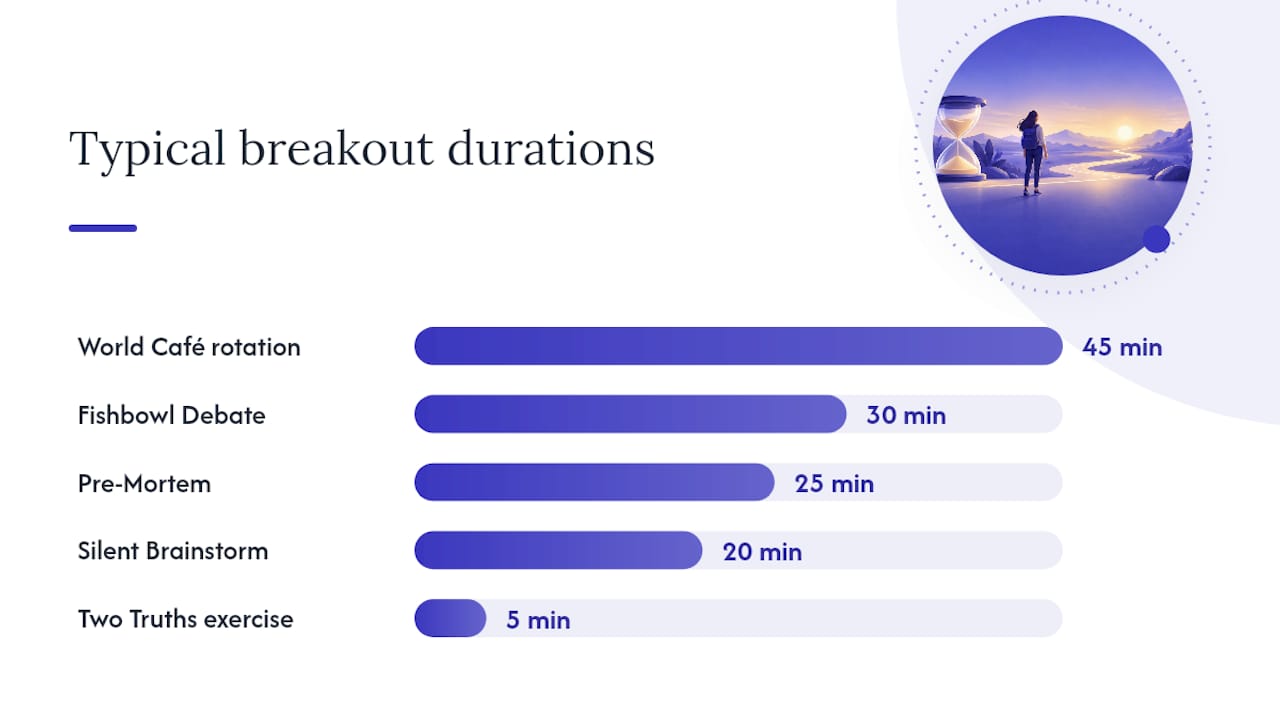
- World Café: small tables rotate through several rounds of discussion, with one member staying behind to brief new arrivals. Best for surfacing broad input across 20 to 100 people in 45 to 60 minutes.
- Fishbowl: a small inner circle debates while everyone else listens, then rotates in. Ideal for airing tension or contrasting views without turning it into a shouting match, typically 30 to 45 minutes.
- Campfire: a short presentation, five to ten minutes, followed by facilitated discussion at each table. Works well when you need to teach a concept and then have people wrestle with applying it.
- Roundtable: fixed small groups work one problem for the full session, producing a single output per table. Good for 6 to 10 people per group over 30 to 90 minutes.
- Lightning talks: rapid-fire presentations, borrowing the pacing of formats like PechaKucha, used to surface many ideas fast before narrowing to a few worth deeper discussion.
Match the format to the objective: World Café for breadth, Fishbowl for debate, Campfire for teaching plus application, roundtable for depth, lightning talks for volume. A simple hybrid, rotate through two short activities, then bring everyone back for a shared synthesis, works when you need both breadth and depth in a single 90-minute block.
How Do You Plan a Breakout Session Step by Step?
Planning breakout sessions gets simpler once you stop treating the small-group time as an afterthought and start treating it as its own mini-agenda with a beginning, middle, and end.
- Write a one-sentence objective. “Groups will identify three barriers to X and rank them” is usable. “Discuss challenges” is not.
- Pair the objective with a single deliverable. A shared doc, a ranked list, a one-slide summary. If a group can’t point to a physical output, the objective was too vague.
- Decide group size and composition. Six to eight people per table balances participation against noise. Stable groups build trust over a multi-day event; randomized groups maximize fresh perspective in a one-off session.
- Set timing with a buffer. Whatever you think the activity takes, add five minutes for people to actually read the prompt and organize themselves.
- Prepare pre-work and templates. A blank doc invites a blank stare. A pre-formatted template with headers and an example row gets groups moving in the first sixty seconds.
- Build in the report-back before the room fills. Decide the format (one slide, ninety seconds, whatever) at the planning stage, not five minutes before you need it.
Pro Tip: Write the deliverable template first, then design the activity backward from it. If you can’t picture what a completed template looks like, the group won’t be able to either.
How Do You Write a Facilitator Script and Assign Roles?
Treat your facilitator instructions like a movie script, not a bullet-point outline. The SessionLab approach to workshop scripting argues that exact timings and exact prompts reduce your dependence on a single gifted facilitator being in every room. That matters because you usually can’t be in every room.
A usable script for each breakout includes:
- The exact prompt, written out word for word, not paraphrased from memory.
- A minute-by-minute timing block, including when to give a two-minute warning.
- A filled-in example of the deliverable so groups know what “done” looks like.
- Success criteria stated plainly, so a co-facilitator can judge if the group is on track.
- Links to shared docs, templates, or tech tools the group needs.
Assign roles inside each group, too: a facilitator to keep time and pacing, a note-taker, a reporter for the plenary share-out. Role assignment prevents passive observation and keeps groups productive without constant intervention. For higher-stakes sessions, add an includer whose job is to pull in quiet voices, or a skeptic tasked with stress-testing the group’s conclusion before it goes to plenary. Scale the script’s detail up when co-facilitators are scarce, down when you’ve got a trained helper at every table.
How Do You Run Breakouts Virtually or in a Hybrid Format?
Virtual breakouts fail for one reason more than any other: nobody structured them. Zoom breakout rooms need the same explicit instructions and facilitator presence a physical room gets, or engagement collapses into one person talking while three others mute their cameras.
- Pre-assign groups instead of using automatic assignment, so composition matches your planning decisions, not random chance.
- Add a co-host to every room, or rotate the main facilitator through rooms on a schedule participants know in advance.
- Use a live shared deliverable, a Google Doc, Miro board, or Jamboard, so you can monitor progress and pull data for the report-back without physically dropping into every room.
- Set expectations on camera and mic use at the top of the session so silence doesn’t get mistaken for disengagement.
- Give a two-minute and a thirty-second warning before rooms close, every single time.
Pro Tip: Open every shared doc with the group’s name and prompt already filled in. A blank Google Doc reads as “figure it out yourself.” A doc with a header and one example row reads as “here’s exactly what we need from you.”
What Room Setup and Logistics Do In-Person Breakouts Need?
Furniture drives behavior more than most planners give it credit for. Rows of chairs facing forward kill discussion before it starts; round tables of six to eight invite it. Fishbowl needs an inner and outer circle, which most standard conference rooms aren’t set up for by default, so flag that request with your venue early.
Materials checklist:
- Table signage with the group’s assigned topic or number, visible from across the room.
- Printed prompts at every seat, not just projected on a screen nobody in the back can read.
- Markers, flip charts, or sticky notes matched to the activity.
- A visible link or QR code to the digital deliverable template.
- Power access if laptops are involved, which venues routinely underestimate.
Build a transition buffer of at least three minutes into your run-of-show between plenary and breakout, longer for large rooms. Announce the move before people stand up, not after, and give a physical signal, a chime, a raised hand, a house-light change, so the room self-organizes without you shouting over a hundred conversations.
How Do You Handle a Breakout That’s Going Sideways?
Every facilitator has watched one person hijack a table or a group go completely silent. Both have quick fixes. For a dominant voice, redirect with a direct ask someone else at the table: “What’s your read on this?” works better than a general “let’s hear from others.” For silence, drop a more specific sub-question than your original prompt. Broad prompts produce silence; specific ones produce answers.
Facilitator drop-ins work best when you announce them at the start: “I’ll be circulating and might ask where you’re at.” Silent, unannounced hovering reads as surveillance and shuts groups down. Recommendations on breakout facilitation consistently point to advance notice about timing and check-ins as the difference between groups that trust the process and groups that resent it.
Report-back design is where most sessions lose the value they built. A ten to fifteen minute synthesis segment isn’t optional, it’s the step that turns six disconnected conversations into one shared output. Cap each group at one slide or ninety seconds. Assign someone, you or a co-facilitator, to harvest action items live on a shared screen as groups report, so the plenary walks away with a document instead of a memory.
What Are Some Ready-to-Use Breakout Ideas by Objective?
Pick from these based on what you actually need the room to produce, not what sounds fun on a slide.
Networking:
- Two Truths and a Business Card: pairs share two facts and one professional goal, five minutes, no deliverable needed.
- Speed Round Introductions: ninety seconds per person, rotate every three minutes for fifteen minutes total, deliverable is a shared contact list.
- Problem Swap: each person states one challenge, the group offers one resource or contact, twenty minutes.
Ideation:
4. World Café Rotation: three rounds, fifteen minutes each, deliverable is a synthesized theme sheet per table.
5. Silent Brainstorm: five minutes of individual sticky notes before any talking, then group clustering, twenty minutes total.
6. Worst Possible Idea: groups generate deliberately bad solutions first to loosen up before the real ideation round, fifteen minutes.
Skill practice:
7. Script Role-Play: pairs practice a specific conversation script, switching roles halfway, twenty minutes, deliverable is written feedback notes.
8. Case Study Diagnosis: small groups apply a framework to a sample scenario, thirty minutes, deliverable is a one-page action plan.
9. Peer Coaching Triads: three-person rotations, one presents a real challenge, one coaches, one observes, fifteen minutes per rotation.
Decision-making:
10. Fishbowl Debate: inner circle argues opposing positions, outer circle takes notes, then swaps, thirty minutes.
11. Dot-Vote Prioritization: groups generate options, then vote with physical or digital dots to rank them, twenty minutes.
12. Pre-Mortem: groups imagine a plan has failed and work backward to identify why, twenty-five minutes.
For virtual versions, swap sticky notes for a shared Jamboard and dot-voting for a poll tool. For five-minute micro-breakouts, cut any activity to a single prompt and a verbal-only report, no written deliverable required.
A Copy-Paste Agenda for a 60 to 90 Minute Breakout Session
Here’s a scriptable template you can hand to a co-facilitator without a briefing call.
- Minutes 0 to 5: Plenary framing. Facilitator states the objective aloud and points to the deliverable template on screen.
- Minutes 5 to 10: Group assignment and physical or virtual movement, plus role assignment (facilitator, note-taker, reporter).
- Minutes 10 to 40: Core activity, following your chosen format’s script exactly, with a five-minute and a two-minute warning built in.
- Minutes 40 to 55: Report-back, one slide or ninety seconds per group, action items captured live on a shared screen.
- Minutes 55 to 60: Plenary synthesis, facilitator names the two or three themes that surfaced and states next steps.
Adapt the timing proportionally for a 60-minute slot versus a 90-minute one, and add a co-facilitator or tech shadow role for groups larger than eight tables. Effective facilitation approaches often rely on the principle that a drill only works if everyone knows their role before the whistle blows. Insert your own case study, prior event data, or testimonial in the framing step to make the objective concrete for that specific room.
Pro Tip: Rehearse your own script out loud once before the event, timing yourself. Scripts that look tight on paper often run long the first time a real human reads them aloud.
What Happens When a Breakout Group Turns Into a Conflict?
Tension in a breakout usually comes from one of two places: a genuine disagreement about substance, or a personality clash that has nothing to do with the prompt. Treat them differently.
For substantive disagreement, redirect the group toward the deliverable itself. Ask them to write down both positions on the shared template and let the report-back surface the tension to the full room instead of trying to resolve it at the table. That keeps the small group moving instead of stalling on a debate it was never equipped to settle.
For personality conflict, a facilitator drop-in matters more than any script. Approach quietly, ask a specific question that redirects energy toward the task (“Where are you two on the second bullet?”), and don’t make the intervention public. Calling out tension in front of the whole table usually escalates it.
Watch for the quieter failure mode, too: groupthink, where one confident voice steamrolls the room and nobody pushes back. Assigning a skeptic role, as mentioned earlier, heads this off before it starts. If a group goes completely silent instead, that’s rarely defiance. It’s usually confusion about the prompt. A specific follow-up question almost always unlocks it faster than more time.
Set the tone early: tell every group at the start that respectful disagreement is expected and useful. Groups that hear that permission up front handle friction far better than groups left to guess whether conflict is allowed.
How Do You Adapt Breakouts for Different Group Sizes and Participant Types?
A breakout format is not one-size-fits-all, no matter how well the script works with your pilot group. Group size changes what’s even possible.
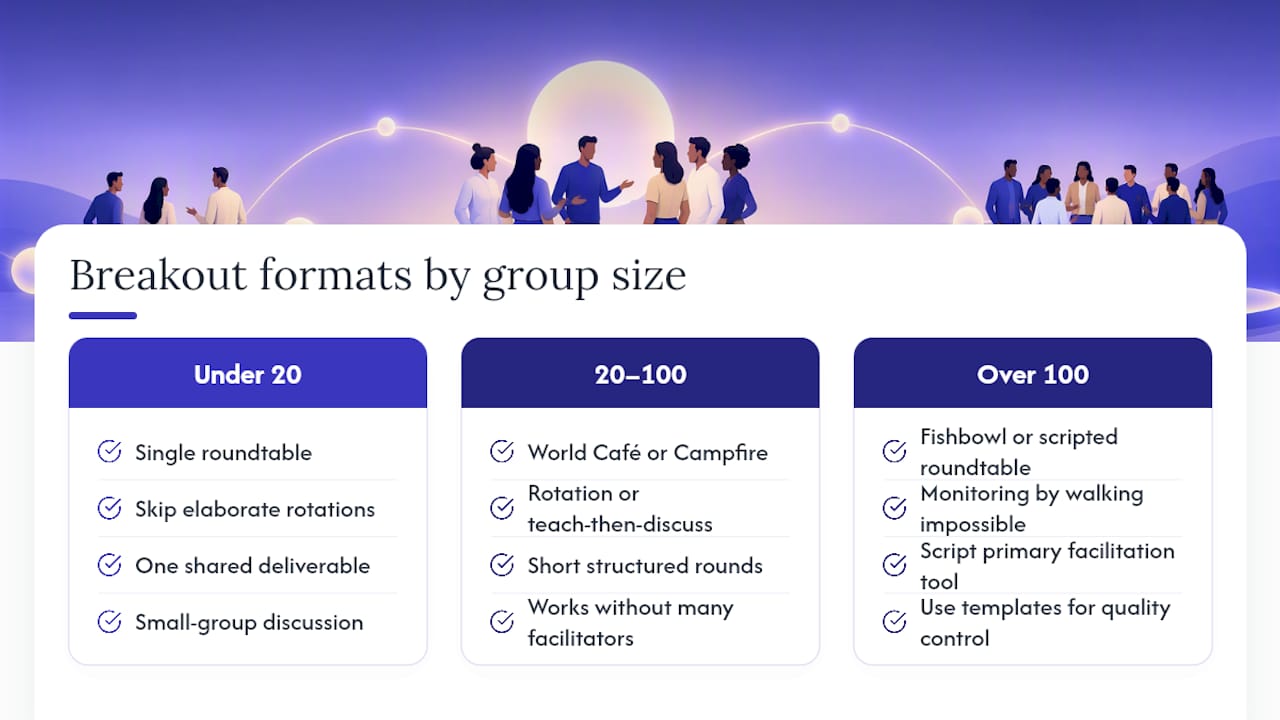
For fewer than 20 people, skip elaborate rotations. A single roundtable format with one shared deliverable often beats a complicated multi-round design, since there’s not enough volume to justify the overhead. For 20 to 100 people, World Café or Campfire formats work well because the rotation or short teach-then-discuss structure gives structure without requiring dozens of facilitators. Above 100, you need Fishbowl or a heavily scripted, template-driven roundtable model, since monitoring quality control by walking around simply isn’t possible at that scale, and your written script becomes the primary facilitation tool.
Participant type matters as much as headcount. Senior executives often resist activities that feel like a classroom exercise. Keep the prompt sharp, the time short, and the deliverable clearly tied to a business outcome. Early-career participants or students, by contrast, often need more structure and explicit permission to speak up. Guidance on breakout composition suggests that for groups meeting across multiple sessions, keeping the same group stable and rotating roles periodically builds the trust that a one-off randomized group never gets the chance to develop.
Mixed-seniority rooms need explicit ground rules, stated aloud, that every voice gets equal airtime regardless of title. Without that instruction, hierarchy reasserts itself inside small groups just as fast as it does in a plenary.
Middy Matthews’ Perspective: Training, Not Selling, Applies to Facilitation Too
I’ve spent thirty years watching what separates a drill that builds a skill from one that just fills time, first on a competitive field, then in real estate, now in rooms full of people trying to get better at their jobs. The parallel holds: practice only works when everyone knows their role and there’s a feedback loop that tells them how they did.
That’s why I obsess over the deliverable, not the discussion. A group that talks for twenty minutes and produces nothing walks away with a good feeling and no behavior change. A group that walks away with a filled-in template, a ranked list, a written commitment, actually does something different on Monday. If your stakes are high enough that a mediocre breakout would cost you real credibility with the room, that’s usually the moment to bring in someone who designs this for a living.
— Middy
Let Middy Design and Run the Breakout for You
If you’d rather hand this off than script it yourself, that’s exactly the gap Middy fills. Instead of piecing together a format, a facilitator script, and a deliverable template from scratch, you get someone who has spent three decades building drills that change behavior, applied directly to your event’s breakout design.
Booking Middy for an interactive workshop means the facilitation script, the role assignments, and the deliverable templates arrive built around your room, your objective, and your audience, not a generic template pulled off a blog. For teams that need a full block of hands-on practice rather than a single session, the half-day training format builds in multiple breakout rounds with report-backs baked into the flow. Planners who need a broader event framework, including panel moderation, can start at Middy to see which format fits. If your event includes complex logistics beyond the breakout itself, a partner like Veil Concierge’s event planning services can help coordinate the pieces around it. Reach out through the sales keynote page to talk through your agenda and get a custom facilitation script built for your specific room.
Sources
- A step-by-step guide to planning a workshop (SessionLab)
- Using Zoom breakout rooms effectively (Indiana University CITL)
- Breakout session type descriptions (NACCHO)
- Six tips for great breakout rooms online (Shawnee State University)
- Student perspectives on using breakout rooms effectively (CITLS, Lafayette College)
FAQ
What Does “Breakout Session” Mean?
A breakout session is a smaller group activity that splits a larger meeting or conference into clusters, each working a focused task before reporting back to the full group. The point is active participation and a concrete output, not just smaller-scale discussion.
Is It “Breakout” or “Break Out Session”?
“Breakout” is the correct single-word form when used as a noun or adjective, as in “breakout session” or “breakout room.” “Break out” as two words is a verb phrase, used when something breaks out of a container, not the name of the activity.
How Do You Create a Breakout Room?
On most virtual platforms, a host can create breakout rooms by selecting the breakout feature, choosing automatic or manual assignment, and setting the number of rooms before launching the session. Pre-assigning participants rather than relying on automatic assignment gives you control over group composition and equity, which matters more than most hosts realize until a room goes quiet.
Can You Create Breakout Sessions in Teams?
Yes, Microsoft Teams supports breakout rooms within its meeting features, allowing hosts to split participants into smaller virtual rooms and bring them back together. The setup mirrors other platforms: assign rooms in advance, prepare a shared deliverable link for each group, and set a clear time limit before launching.
What Should Go Into a Facilitator Script for a Breakout?
A usable script includes the exact prompt, a minute-by-minute timing plan, a filled-in example of the deliverable, and clear success criteria, so a co-facilitator can run it without you in the room. This scripting approach reduces dependence on any single facilitator’s instincts and makes the session reproducible across multiple rooms or events.
Leave a Reply